
Extract Tables from Images and PDFs
Tables in images and PDFs, delivered as reviewable cells and spreadsheets.
- 3 formats
- XLSX
- 10 MB
Extract Tables from Images and PDFs
Table 1
| Supplier | Purchase | |||
| Item | Qty | Unit price | Amount (USD) | |
| Orchard Tools | SKU 00017 Blue folders | 4 | 2.50 | 10.00 |
| Orchard Tools | SKU 00018 Review notebooks | 3 | 6.50 | 19.50 |
| Subtotal(USD) | 29.50 | |||
Table 2
| Key | Value |
| Reference | PAY-0009 |
| Tax(13%) | 3.84 |
| Total(USD) | 33.34 |
Table 3
| Code | Units | Warehouse |
| 00017 | 4 | A |
| 00018 | 3 | B |
Table sources and structured results
Synthetic material
Source file
Multitable purchase details
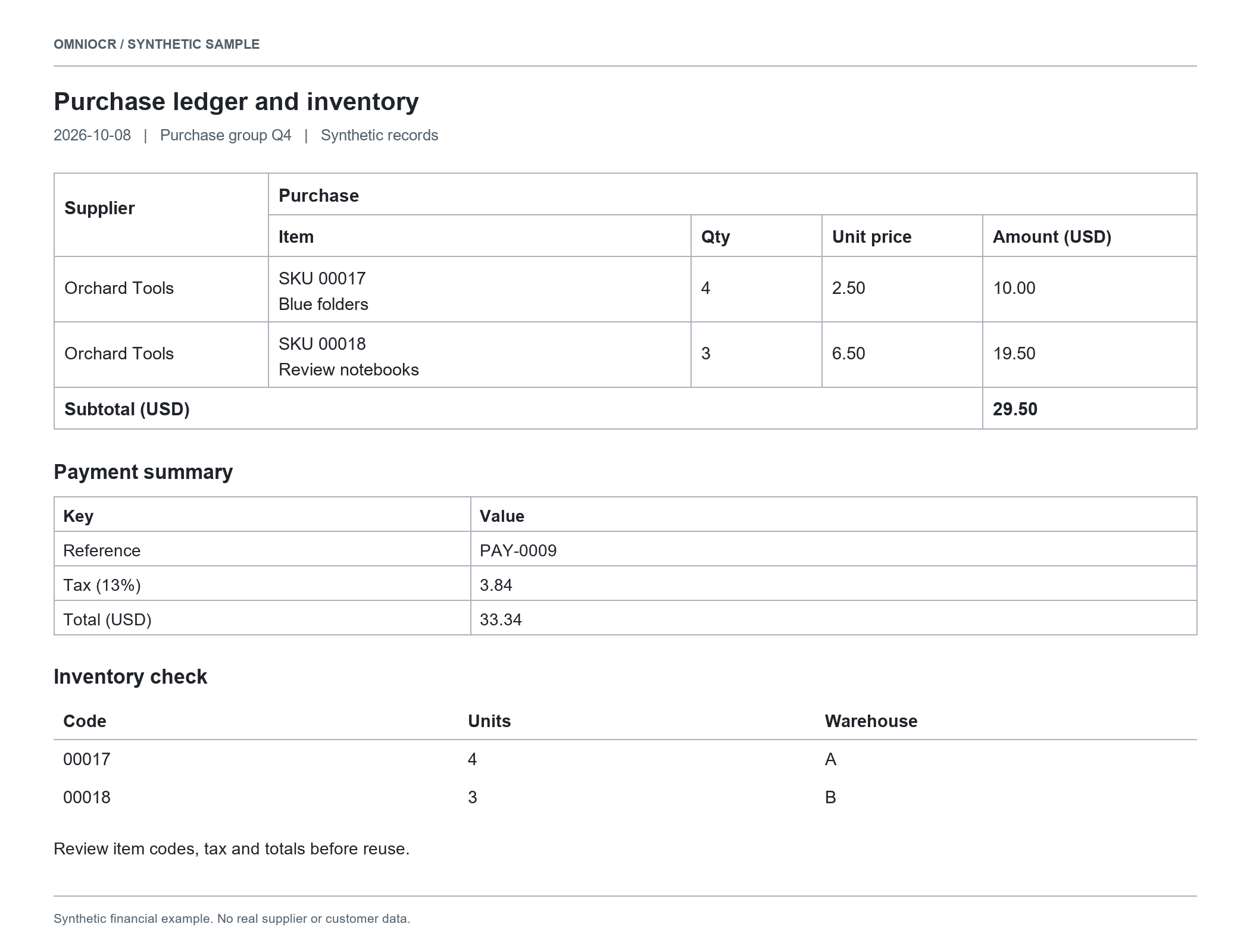
Recognized result
Table 1
| Supplier | Purchase | |||
| Item | Qty | Unit price | Amount (USD) | |
| Orchard Tools | SKU 00017 Blue folders | 4 | 2.50 | 10.00 |
| Orchard Tools | SKU 00018 Review notebooks | 3 | 6.50 | 19.50 |
| Subtotal(USD) | 29.50 | |||
Table 2
| Key | Value |
| Reference | PAY-0009 |
| Tax(13%) | 3.84 |
| Total(USD) | 33.34 |
Table 3
| Code | Units | Warehouse |
| 00017 | 4 | A |
| 00018 | 3 | B |
Check merged headings, leading zeros, quantities, and totals against the source.
Table material
Grouped and merged headings
Review heading relationships, spans and the first data row.
Multiple or borderless tables
Review separate tables individually rather than guessing columns from spaces.
Multiline item details
Check wrapped item descriptions and codes for shifted rows.
Table delivery formats
| Format | Content | Boundary |
|---|---|---|
| ExcelXLSX | A separate worksheet for each table, with supported merges | Values remain text; check cell types before calculations |
| CSVCSV | One selected table as two-dimensional text data | No font or merge styling; risky prefixes use safe text handling |
| Source MarkdownMD | Recognized body text and provider table notation | HTML tables need a compatible editor |
Cells and data boundaries
| Content | What is retained | Boundary |
|---|---|---|
| Rows and columns | A shared structure keeps cell content and column positions | Blurred or cropped sources can still cause recognition mistakes |
| Merged cells | Supported row and column spans remain in Excel | CSV uses empty positions, not visual merging |
| Multiple tables | Separate Excel worksheets; an explicit single table for CSV | Tables are not automatically combined into a financial summary |
| Codes and amounts | Text preserves existing leading zeros and does not execute formulas | Review recognized numbers and totals manually |
Continue your spreadsheet work
Purchase details
Review codes, wrapped descriptions, quantities and amounts.
Report tables
Keep headings and separate tables for table-by-table review.
Inventory and code lists
Keep leading zeros and text IDs before import into another system.
Table review checklist
Heading relationships
Match each column to its grouped heading and unit.
Codes and wrapping
Review SKU leading zeros and wrapped descriptions staying on the right row.
Tax and totals
Compare decimals, currency, tax and total amounts with the source.
Material and workflow
This table source
Review it, then choose Excel or select one table for CSV.
Several source files
The existing queue runs in order, with independent file results.
Body text matters too
Word tasks retain paragraphs and supported table content.
Table delivery questions
Before you start
- JPG, PNG, and PDF files are supported up to 10 MB per file.
- Excel keeps detected tables on separate worksheets; CSV contains one selected table and does not preserve merged-cell formatting.
- If no table is detected, table exports are unavailable. Check important amounts against the source.
Image text extraction
Image clarity, framing and text review
Working with JPG documents
Checks for photos and compressed images