
PDF to Markdown
PDF paragraphs, headings, lists and tables as Markdown material.
- MD
- 10 MB
PDF to Markdown
## Orchard project update

2026-10-08 DOC-00017 Review version 03

The team is preparing an editable archive of internal project notes. Each document should keep its headings, numbered actions and table content so reviewers can continue working in a document editor.

The material in this sample is synthetic and contains no real customer information. Dates, owners and task statuses are example values for review.

## Delivery scope

1. Review source order and important identifiers.

2. Keep tables editable for the next review.

3. Save the approved text as a Word document.

## Review schedule

<table border="1"><tr><td>Milestone</td><td>Owner</td><td>Due</td><td>Status</td></tr><tr><td>Draft review</td><td>Alex</td><td>October 12</td><td>Ready</td></tr><tr><td>Table check</td><td>Morgan</td><td>October 14</td><td>Pending</td></tr><tr><td>Final archive</td><td>Taylor</td><td>October 16</td><td>Planned</td></tr></table>

## Next actions

7. Verify DOC-00017 and all due dates.

8. Compare the exported tables with the source.

Cost per document = monthly budget / reviewed documents

## Reference

https://example.com/docs/document-review?revision=2026-10

## Procurement appendix - page 2

2026-10-08 Purchase group Q4 Synthetic records

<table border="1"><tr><td rowspan="2">Supplier</td><td colspan="4">Purchase</td></tr><tr><td>Item</td><td>Qty</td><td>Unit price</td><td>Amount(USD)</td></tr><tr><td>Orchard Tools</td><td>SKU 00017Blue folders</td><td>4</td><td>2.50</td><td>10.00</td></tr><tr><td>Orchard Tools</td><td>SKU 00018Review notebooks</td><td>3</td><td>6.50</td><td>19.50</td></tr><tr><td colspan="4">Subtotal(USD)</td><td>29.50</td></tr></table>

## Payment summary

<table border="1"><tr><td>Key</td><td>Value</td></tr><tr><td>Reference</td><td>PAY-0009</td></tr><tr><td>Tax(13%)</td><td>3.84</td></tr><tr><td>Total(USD)</td><td>33.34</td></tr></table>

## Inventory check

<table border="1"><tr><td>Code</td><td>Units</td><td>Warehouse</td></tr><tr><td>00017</td><td>4</td><td>A</td></tr><tr><td>00018</td><td>3</td><td>B</td></tr></table>

## Final checkpoint: ORCHARD-QUALITY-2408
PDF material and source Markdown
Synthetic material
Source file
Report and procurement appendix
PDF first page
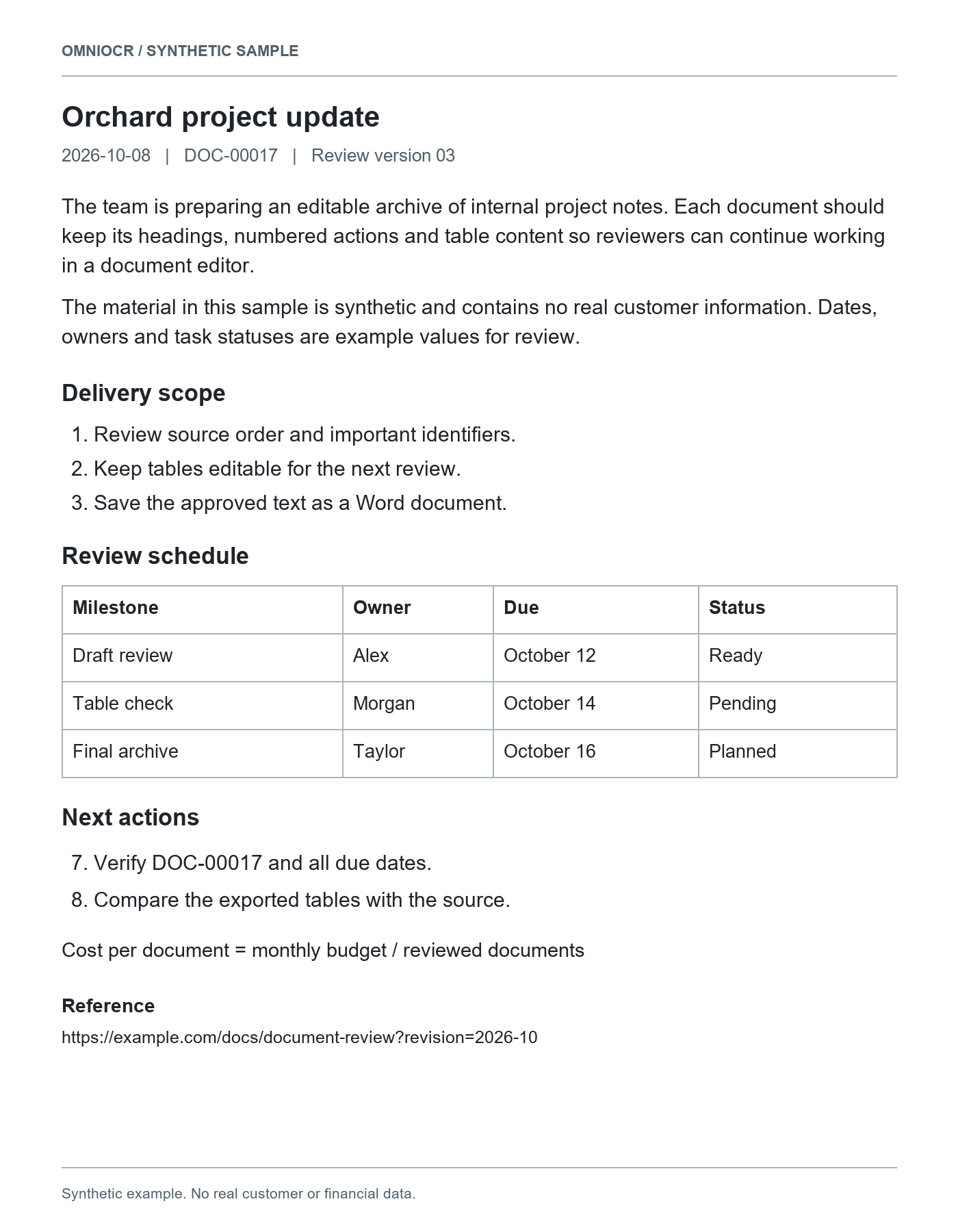
Recognized result
## Orchard project update

2026-10-08 DOC-00017 Review version 03

The team is preparing an editable archive of internal project notes. Each document should keep its headings, numbered actions and table content so reviewers can continue working in a document editor.

The material in this sample is synthetic and contains no real customer information. Dates, owners and task statuses are example values for review.

## Delivery scope

1. Review source order and important identifiers.

2. Keep tables editable for the next review.

3. Save the approved text as a Word document.

## Review schedule

<table border="1"><tr><td>Milestone</td><td>Owner</td><td>Due</td><td>Status</td></tr><tr><td>Draft review</td><td>Alex</td><td>October 12</td><td>Ready</td></tr><tr><td>Table check</td><td>Morgan</td><td>October 14</td><td>Pending</td></tr><tr><td>Final archive</td><td>Taylor</td><td>October 16</td><td>Planned</td></tr></table>

## Next actions

7. Verify DOC-00017 and all due dates.

8. Compare the exported tables with the source.

Cost per document = monthly budget / reviewed documents

## Reference

https://example.com/docs/document-review?revision=2026-10

## Procurement appendix - page 2

2026-10-08 Purchase group Q4 Synthetic records

<table border="1"><tr><td rowspan="2">Supplier</td><td colspan="4">Purchase</td></tr><tr><td>Item</td><td>Qty</td><td>Unit price</td><td>Amount(USD)</td></tr><tr><td>Orchard Tools</td><td>SKU 00017Blue folders</td><td>4</td><td>2.50</td><td>10.00</td></tr><tr><td>Orchard Tools</td><td>SKU 00018Review notebooks</td><td>3</td><td>6.50</td><td>19.50</td></tr><tr><td colspan="4">Subtotal(USD)</td><td>29.50</td></tr></table>

## Payment summary

<table border="1"><tr><td>Key</td><td>Value</td></tr><tr><td>Reference</td><td>PAY-0009</td></tr><tr><td>Tax(13%)</td><td>3.84</td></tr><tr><td>Total(USD)</td><td>33.34</td></tr></table>

## Inventory check

<table border="1"><tr><td>Code</td><td>Units</td><td>Warehouse</td></tr><tr><td>00017</td><td>4</td><td>A</td></tr><tr><td>00018</td><td>3</td><td>B</td></tr></table>

## Final checkpoint: ORCHARD-QUALITY-2408
Compare page order, headings, and table content with the source PDF.
Source material
Scanned material
Keep page edges and readable text; remove document protection.
Digital PDFs
Processed through OCR too; review the reading order.
Mixed documents
Check paragraphs, lists and tables separately from page appearance.
Research delivery formats
| Format | Content | Boundary |
|---|---|---|
| MarkdownMD | Headings, lists and recognized source content | Review table and formula notation in your editor |
| Plain textTXT | Paragraphs, wording and list numbers | No font or table styling |
| WordDOCX | Editable paragraphs, headings, lists and supported tables | Layout, images and formulas can differ from the source |
Markdown content structure
| Content | What is retained | Boundary |
|---|---|---|
| Headings | Recognized sections as heading text | Review hierarchy against the source |
| Paragraphs and lists | Recognized wording, items and numbers | Columns and margin notes can affect reading order |
| Tables | Source notation can contain Markdown or HTML tables | Complex merges display differently across editors |
| Formulas | Recognized formula text or LaTeX | Review symbols; your editor must support rendering |
Continue your research work
Working notes
Bring headings and lists into a Markdown-compatible notes app.
Document archives
Keep searchable text and retain the source PDF for review.
Table and formula excerpts
Keep notation and inspect its display in the target editor.
Review before organizing
Order and last page
Check continuous multi-page content through the last page.
Headings and table notation
Review heading levels and HTML table display in your tool.
Symbols and links
Review formula characters, list numbers and destinations.
Material and workflow
This PDF
Download reviewed source content without another OCR run.
Word editing
Keep editable paragraphs and supported document structures.
Spreadsheet work
Use the table task for cell-focused review and Excel delivery.
PDF research questions
Before you start
- PDF files up to 10 MB and 10 pages are supported. Encrypted, damaged, or longer documents are rejected.
- Scanned pages are recognized as text. Page order does not reproduce the original page geometry.
- Formulas are returned as reviewable text when available. Recognition uses the existing OCR credit rules.
Extracting scanned PDF text
Page limits, order and source review
Working with PDF Markdown
Headings, tables and formula text